
Phraser - Paste Keyboard1.5.0 - App Store
You'll be able to see results in few seconds.
Publisher Description

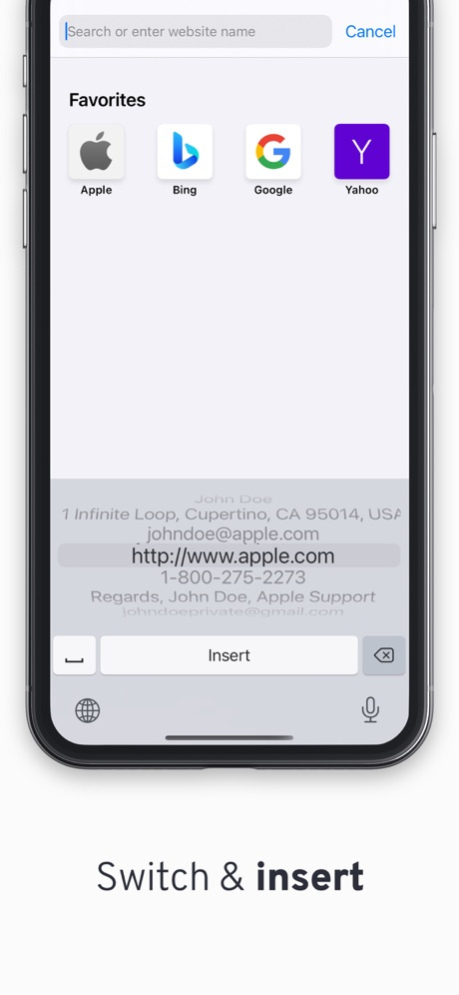
Have your often-used information right at your fingertips!
Hate entering your 48 character long e-mail address all the time? Or the "Goodbye, hope you are doing well. Talk soon."? Or maybe you just forget a lot of information, like your passwords?
Then Phraser is the Keyboard you need!
Quickly enter the information you want to save for later. Easily switch to the keyboard just like you switch to your Emojis. Insert!
Perfect for places like TikTok, Snapchat and Jodel where its great to have that perfect caption right at your fingertips and ready to be pasted.
There is no limit to what you can paste or how many things you can store.
The keyboard is installed by going to Settings -> General -> Keyboard -> Keyboards -> Add New Keyboard.
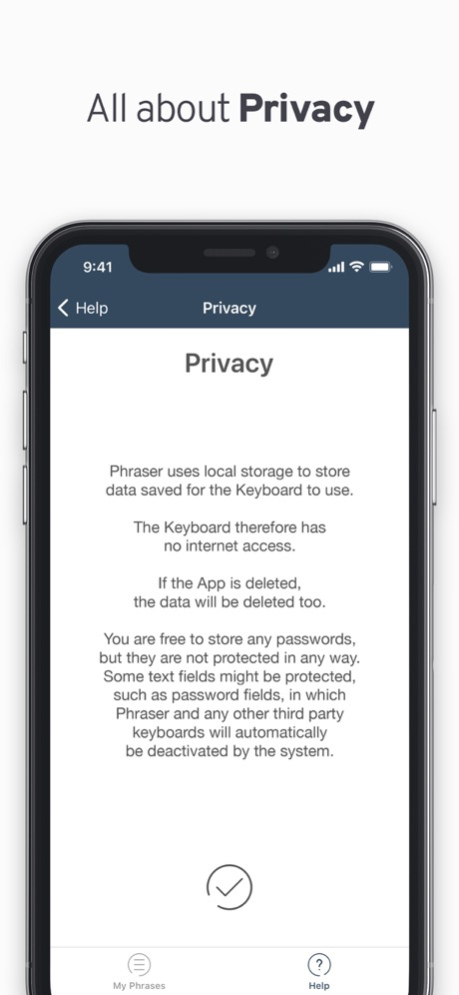
Privacy:
Phraser stores data locally on your phone.
The keyboard therefore has no internet access.
If the App is deleted, the data will be deleted too.
You are free to store any passwords, but they are not protected in any way.
Some text fields might be protected, such as password fields, in which Phraser and any other third party keyboards will automatically be deactivated by the system.
Version History Fixed bugs and added new button to go to next line! 1.5.0 Mar 27 - Stability improvements 1.4.4 11/28/2024 - Bug fixes 1.4.3 04/18/2024 Bug fixes. 1.4.2 09/07/2022 Bug fixes. 1.4.1 09/02/2022 Added new localisations. 1.4.0 08/27/2022 Bug fixes. 1.3.2 08/22/2022 Bug fixes. 1.3.1 08/21/2022 Phraser now has Dark Mode and support for text over multiple lines. 1.3.0 07/07/2021 Phraser has been updated to use the latest technologies and look beautiful on any device. 1.2.2 12/21/2018 This update features some minor improvements to the UI. 1.2.1 07/31/2017 Thank you for using Phraser!
This update features a completely revamped UI to both the main app & the keyboard.
Enjoy! 1.2.0 07/25/2017 Thank you for using Phraser.
This update brings several both minor and major fixes and changes to the UI in both the App and the Keyboard Extension. 1.1.0 04/17/2017 Hope you are enjoying Phraser!
This update lets you hold down the delete button to delete text.
Anything you would like to see in future updates? Let us know! 1.0.1 05/06/2016 1.0 05/04/2016
About Phraser - Paste Keyboard
The company that develops Phraser - Paste Keyboard is Casper Riboe. The latest version released by its developer is 1.5.0.
To install Phraser - Paste Keyboard on your iOS device, just click the green Continue To App button above to start the installation process. The app is listed on our website since 2026-10-14 and was downloaded 0 times. We have already checked if the download link is safe, however for your own protection we recommend that you scan the downloaded app with your antivirus. Your antivirus may detect the Phraser - Paste Keyboard as malware if the download link is broken.
How to install Phraser - Paste Keyboard on your iOS device:
- Click on the Continue To App button on our website. This will redirect you to the App Store.
- Once the Phraser - Paste Keyboard is shown in the iTunes listing of your iOS device, you can start its download and installation. Tap on the GET button to the right of the app to start downloading it.
- If you are not logged-in the iOS appstore app, you'll be prompted for your your Apple ID and/or password.
- After Phraser - Paste Keyboard is downloaded, you'll see an INSTALL button to the right. Tap on it to start the actual installation of the iOS app.
- Once installation is finished you can tap on the OPEN button to start it. Its icon will also be added to your device home screen.
Program Details
System requirements
Download information
Pricing
Version History
version 1.5.0
posted on 2026-10-14
Version History Fixed bugs and added new button to go to next line! 1.5.0 Mar 27 - Stability improvements 1.4.4 11/28/2024 - Bug fixes 1.4.3 04/18/2024 Bug fixes. 1.4.2 09/07/2022 Bug fixes. 1.4.1 09/02/2022 Added new localisations. 1.4.0 08/27/2022 Bug fixes. 1.3.2 08/22/2022 Bug fixes. 1.3.1 08/21/2022 Phraser now has Dark Mode and support for text over multiple lines. 1.3.0 07/07/2021 Phraser has been updated to use the latest technologies and look beautiful on any device. 1.2.2 12/21/2018 This update features some minor improvements to the UI. 1.2.1 07/31/2017 Thank you for using Phraser!
This update features a completely revamped UI to both the main app & the keyboard.
Enjoy! 1.2.0 07/25/2017 Thank you for using Phraser.
This update brings several both minor and major fixes and changes to the UI in both the App and the Keyboard Extension. 1.1.0 04/17/2017 Hope you are enjoying Phraser!
This update lets you hold down the delete button to delete text.
Anything you would like to see in future updates? Let us know! 1.0.1 05/06/2016 1.0 05/04/2016
version 1.4.4
posted on 2024-11-28
Nov 28, 2024
Version 1.4.4
- Stability improvements
version 1.4.4
posted on 2024-11-28
- Stability improvements
version 1.4.2
posted on 2022-09-07
Sep 7, 2022
Version 1.4.2
Bug fixes.
version 1.3.1
posted on 2022-08-21
Aug 21, 2022 Version 1.3.1
Bug fixes.
version 1.3.0
posted on 2021-07-07
Jul 7, 2021 Version 1.3.0
Phraser now has Dark Mode and support for text over multiple lines.
Disclaimer
Official App Store Link
We do not host Phraser - Paste Keyboard on our servers. We did not scan it for viruses, adware, spyware or other type of malware. This app is hosted by Apple and passed their terms and conditions to be listed there. We recommend caution when installing it.
The App Store link for Phraser - Paste Keyboard is provided to you by apps112.com without any warranties, representations or guarantees of any kind, so access it at your own risk.
If you have questions regarding this particular app contact the publisher directly. For questions about the functionalities of apps112.com contact us.
